Themes
Themes can be installed into your preferred Library/Themes directory. They can be installed into the typical Local, Network or System domains, but also in each user's private Library directory. On a Unix system this is typically located in the home directory, ˜/GNUstep/Library/Themes, on windows it is in C:\GNUstep\Library even if GNUstep was installed on a different Drive or on a different location.
The easiest way to use a theme is to select it from the standard info-panel of an application. At the bottom the current used theme is shown, click on the name and a panel with the list of all available themes is displayed.
Pure Pixmap themes may just be installed via drag&drop, while themes containing code need to be compiled for each platform they run on. The easiest way is to use Thematic to build them.
Heritage
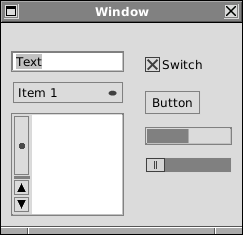
This theme is the ultimate classic, vintage NeXT theme: it tries to carry the heritage to the extreme, with detailed icons, original but enhanced look of icons and quite some skeumorphism.
Folder icons used in Workspace are provided for the most classical experience, colors and perspective are a true reinterpretation of the original masterpiece.
Sleek
This is a modern-looking, flat, low-contrast and monochrome theme. Square and gray, but easy to the eye.
Completely flat, 3D effects are removed, elements are mostly rendered in dark grey and light grey, without recurring to white and black where possible
Neos
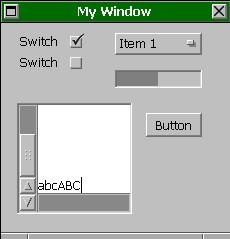
This theme closely follows the original NeXT look and feel. The controls and the user interface have the same guidelines, the menus, scrollbars and general impression are familiar to the old-style user. But the Shades are more subtle, several controls look the same, but are made less intrusive, more subtle. Some icons are smoother.
Currently this is a pure Pixmap theme. It can be installed by just copying the bundle into your preferred Themes directory.
0.1
First official public release, 21th Oct 2011. The theme is ready for usage, but it is incomplete in that not all controls are completely themed.
Download 0.1 version.
WinClassic
This theme tries to reproduce the Windows look without resorting to native theming, it is thus portable. The theme is a breed of Windows 2000 and WinXP/Vista with the classic look. The icons are custom artwork inspired in colors, but adapted to the needs of GNUstep in both function and size.
This theme follows the interface guidelines of Windows as close as possible with standard GNUstep customization. Thus it has a familiar look also for CDE/Motif, OS/2 and GNOME or KDE users, since they follow the same principles:
- In-window menus
- Scrollbars on the right of the views
- Scroll buttons at bottom and top
- Brighter colours for the standard sRGB colour space
Currently this is a pure Pixmap theme. It can be installed by just copying the bundle into your preferred Themes directory.
2009 Sept 14
Early Bird release. The theme is ready for use, but it is incomplete in that not all controls are completely themed. The main work is on the scrollers, the buttons, tabs and outline view. Also the icons were recreated to be suitable (folder Icon, home icon).
Note: This theme enables advanced interface features which are new and not yet perfect. Most notably the theme enables in-window menu according to the CUA, scrollers with separate thumbs and placed on the right. If you have trouble with that but still want to take advantage of the look blending better, please edit the theme with Thematic and disable it. Alternatively you can provide patches to GNUstep!
Download Sept 14 version.